Showing posts with label content. Show all posts

Friday, January 15, 2010

On the Hypotenuse

Tēnā koutou katoa – Greetings to you all
Pythagorean Squares
    The area of the square on the hypotenuse of any right-angle triangle
    is equal to the sum of the areas of the squares on the other sides.
    Pythagoras' Theorem

I was hopeless at Mathematics when I began High School. Teachers despaired at my ineptitude. But I had a natural interest in Science.

It was mainly due to good Scottish teaching, and a genuine willingness on my part to engage in learning, that I studied Mathematics to a level that let me reach the highest academic levels in Science.

It was also due in part to the curriculum I followed. I believe that it taught me how to think. It wasn’t that it taught me to think. I could do that. It taught me how to think, and to be able to think in specific ways.

In the 1970s, I taught High School Mathematics to senior level.

Recently, I have become familiar with fundamental changes in the way mathematical thinking is taught in High School in New Zealand.
I suspect that these are similar to changes in the Mathematics curricula in other western countries.

Get it right

The Euclidean proof of the useful Theorem of Pythagoras was one of the things I had to learn for my early qualifying examinations at High School. My mother learnt the same proof when she attended High School.

Euclid’s proof was taught in New Zealand schools until changes were made in the curriculum towards the end of last century (
20th). It is now supplanted by what I’d call a non-proof. What young minds are required to study about the Pythagorean Theorem in New Zealand today is certainly not a proof of it.

Euclid’s proof is based on the properties of rectangles and of triangles that are each of the same shape and size – as well as associated geometry ideas involving these shapes drawn between parallel lines. There are several hundred proofs of this fundamental theorem. Some are outlined in Wikipedia. A few I learnt at High School.

All of the proofs I learnt permitted me to understand, not only how the Pythagorean Theorem can be proved, but also what it is to know the significance of a universal proof. It is a way of thinking that permits a learner to appreciate that a proof needs to be watertight.

What does it prove?

Euclid’s proof can be applied to ANY right-angle triangle, not just a few special triangles. Therein is the difference between what used to be taught and what is now taught.

In High School today, a learner in Mathematics is instructed on how to show that a given right-angle triangle has the Pythagorean property. The instruction is not about any right-angle triangle, but applies only to a particular right-angle triangle that the learner draws.

Essentially, learners follow a recipe that shows that the Theorem may work for their triangle. It provides no real understanding of proof.

Here’s what they are instructed to do:


Counting Squares
Learners in Mathematics are shown how to draw a right-angle triangle on a grid, using simple mathematical drawing equipment. They are also shown how to draw squares on each of the three sides of the triangle. By counting the number of grid squares that make up each of the squares, they can show that the Theorem is followed approximately.

Higher thinking

While this recipe permits the learner to practice skills in using drawing equipment, it provides no understanding of a mathematical proof.
It does not even show conclusively that the Theorem works.
However carefully it is done, not every attempt at adding the squares will show that the Theorem is precise. Check out the squares shown above.

One can argue over the need for the knowledge of how to prove the Pythagorean Theorem. But the significant learning is nothing to do with that knowledge. The thinking skills learnt that permit the learner to understand what a watertight proof is all about are really what are far more useful and relevant to higher thinking skills.

This is the whole point of teaching the proof. It has the potential to permit the learner to realise the significance of a theorem that can be applied universally, and why it has this property. It is a way of thinking analytically that is not being taught today.


Ka kite anō – Catch ya later

Monday, November 9, 2009

Clutter

Tēnā koutou katoa – Greetings to you all
Clutter
    My colleagues and I have been writing learner reports this week. We follow convoluted procedures to ensure no parts are missed. The process is to provide effective feedback.

I reminded myself of the complexity of it all by sneaking a look at instructions that were circulating the office. The directions were clear, linear and easy to follow.

But I had a busy confusion going on in my head as I read them.
I was looking at a block of text that filled a page.

Balance of objectives

In the days when printed instruction was it, squeezing as much text and other information as possible onto a page met some objectives. There is merit in only one page of instruction. Selecting a smaller font-size was a trick I’d seen for ‘getting it all onto one page’.

But at that time, the Science and Art of developing easy-to-follow learner instruction was well known by experienced educators. They knew that ease-of-reading and learner-interest didn’t necessarily follow when information was packed so tightly into a page that you couldn’t put your finger down on bit of white space.

Extremists


White space became a prerequisite for a ‘good looking’ page of instruction. Born out of the look and colour of a blank sheet of plain A4, the ‘white space’ practice was carried, almost to extremes, by some writers and designers who actually shunned text – minimalists who’d trim even a brief, well written instruction.

Margins were widened, headers and footers were deepened.
Text quantity was limited per page.

Tricks and impressions

One trick often used, when no more text culling could be performed on an important block of text, was to emulate the impression of white space by selecting a very pale font colour.


    In this way, otherwise unwanted text could be merged into the background. Of course, it defeated the purpose of providing instruction, for it was almost impossible to read.


No, I’m not knocking white space. It works well when used properly.
It lends itself to good web design and elearning resource design. The look and form of a blog post page can even be improved by applying it.

Techniques I’ve found that reduce the busy look of a page of text are:

  • short paragraphs most readers find spaces between small blocks of text easier on the eye

  • double space around blocked text or images an image can be aesthetically framed by a border of text-free space; the effect is more pleasing and restful on the eye

  • brief subheadings these create chunks of text-free space by default.

You may have other techniques for improving the look of a page.

Why not share some of them here?


Ka kite anō – Catch ya later

Wednesday, August 5, 2009

Pick the Strawberries! GPS Website Gold Rush

Kia ora tātou – Hello Everyone
Pick a Strawberry
If you enjoy Science, and don’t mind reading online, you’ll never be bored visiting LiveScience.com. There is always something there that’s new, interesting, innovative and worth a read.

You might say,

I know lots of Science sites. What’s special about this one?

Well, it’s set up like a blog. Each article is a post. You can comment on the posts and discuss their content with other readers and sometimes with the author.

You could say,

Science sites I know always have the same stuff.
I don’t want to read the same stuff all the time
.


LiveScience posts several times a day, so you’re never short of new things to read. You might then say,

What! Several posts per day! How could I possibly read all those?

You don’t have to. But I recommend you pop the address in your RSS reader rather than bookmark the site.

Just take your pick

The feeds are short summaries, so you can scroll
quickly through six or a dozen of them on your RSS reader to see what takes your fancy.

That’s what I do. Like picking strawberries – I pick ripe and juicy ones. There’s no way I’d sit and gorge them all. But I don’t have to. There will be another pick of fresh juicies to harvest tomorrow.

You’ll maybe say,

What if I want to see what’s gone before?

You can do that too. The site has a great archive and a fine search mechanism that’s easy to use. It also has categories that you can browse, for these tabs
are displayed across the header of the site:

New window link to Video Channels
They give access to the latest articles in the category of your choice.

What do I best like about LiveScience?


LiveScience is hosted by Imaginova, a leading digital and commerce company.The articles are well written, well sourced and invariably well provided with links to the source sites to give you more background information. It’s like a Science newscast, giving you the latest on the most recent that’s hit the news in the world of Science, with the opportunity to read more.

And it’s not all reading either. There are diagrams, displays and illustrations galore, often with informative videos or podcasts, appropriate and relevant to the topic.
link to New Window LiveScience
So if you’d like to taste today’s selection of LiveScience fare, check out this strawberry. You might toss the address into your RSS reader for future munching.

Go on! Spoil yourself.
Pick the strawberries!

pen
A Green Pen Society contribution

Rangimarie - Peace in Harmony

Saturday, July 25, 2009

What Do You Do When You Find A New Site?

Kia ora tātou – Hello Everyone
Baloney in a Magnifier
This morning I came across an unfamiliar site through a post-link I’d followed on a familiar blog. As usual, I did a perfunctory scan of the header and layout of the page. That took a few seconds. Then I got into reading the post. It was well written and the topic was fresh and interesting.

I was almost through the second paragraph when the inquisitor in me took my attention to look for the date of the posting. It wasn’t prominent nor was the post date easy to find. I flicked down to the comments section and picked the date of the first comment: October 21, 2008.

I resumed reading, having sorted in my mind the post’s place in time. About a third way through the text, I started inspecting
intermittently the blogroll, names of commenters, checking out links to other sites, while continuing to read. I recognised that I was looking for links to sites or blogs that I might know.

Priority

It was then I realised that I was subconsciously prioritising my time, and my reading, by checking out the authenticity of the writer before getting further into what was quite a meaty post. In particular, I was scrutinising what I had gleaned from the post so far, weighing that against what I already knew.

I recalled doing this many times in the past when I had come across commercial sites and others that might waste my time while reading cogent story lines that amount to nothing - or worse, pernicious propaganda. The ‘trust’ mechanism within me kicks in fairly rapidly these days. It tends to be vicious if I suspect my time is being wasted.

Do young learners need this?

It also occurred to me that the routine I’d just accomplished was one difficult to explain to a young learner who may need to discover a thing or two about appraising the authenticity of information found on the Internet.

By flitting through what to others may seem a jumble of unrelated checks, I sketch an overview of where the post lies in relation to what I already know. This amounts to my knowledge of the topic and associated writers or sites familiar to me, as well as the possible up-to-date-ness of the information likely to be proffered by the content of the post.

How do you recognise baloney?

My usual reaction to bogus information, once it’s identified, is
instantly to wipe all that I’d held in the temporary enquiry channel of my thinking to do with what I’d read in the post or article, and move on.

Over the years I’ve developed what Carl Sagan referred to as a baloney detection kit. It is only part of the routine I practice when checking out information or ideas new to me. It kicks in at an advanced stage for there is no need to use it if I’d already identified bogus information from perfunctory checks and judicious hunches.

    What do you do when you come across a post on a blog new to you or article on an unfamiliar site on the web?

    Do you use a routine to check out authenticity?

    What would you do if you found that all your commonly used checks and routines returned insufficient information for you to form a useful opinion about the authenticity of an article, or of the information contained there?


Haere rā – Farewell

Saturday, May 2, 2009

All About (digital) Learning Resources

Tēnā koutou katoa – Greetings to you allSection of the Ranginui Door section from the Ranginui Door, Te Papa Museum, Wellington

Tell me and I'll forget; show me and I may remember;
involve me and I'll understand. - Chinese proverb


There have been a few recent posts on an artefact known as the Learning Object - in particular, two by Karl Kapp, Library of Learning Objects and Learning Object Interview.They gave me confidence that what I'd learnt and worked with for the past ten years was not entirely forgotten by others in the field.

The Reusable Learning Object (RLO) or (learning object) was born out of pedagogy, imagination and the technology of the 20th century. It soared almost triumphantly into the 21st century, only to run out of airspeed, stall and nosedive to almost virtual oblivion.

True to the original intensions of its inventors, the RLO has been metaphorically dismantled and rebuilt in different forms. Many of these revamped objects were renamed ‘learning object’.

Others were satisfied to bear the term ‘learning resource’ or other such derivative, such as ‘digital learning resource’, for fear of being associated in some way with the crashed and, as some would have it, disgraced Learning Object.


All this happened a few years before I wrote this article, first published on Futurelab in April 2008. The article was given a favourable review by Stephen Downes. The review, article and its host site were severely criticised, I believe unfairly, by a postmodernist who really didn’t appreciate what the article was attempting to offer.

Here is the text, for those who may be interested to read the history and development of the digital learning resource. Some links to resources are now no longer current.
Links to sections
What is an RLO?
Classification of learning objects and I D theory
What is contained in the RLO?
Granularity
Metadata, storage and retrieval
Learning objects should be practical
Immediacy, interactivity, learning and engagement
Design, development and quality maintenance
Checking out the future
References

What is an RLO?

Have you ever learned how to activate a setting on a mobile phone by studying one of its animated tutorials? Did you at one time make use of online instruction to learn to touch-type or increase your typing speed? Perhaps you were once privileged to operate the controls of a flight simulator as part of the training to become an aircraft pilot. If your answer to any of those is yes then you have benefited from using a learning object.

The learning objects referred to here, and others like them, owe much of their success to one common aspect of their design: feedback that is relevant to the immediate circumstance of the learner - the hallmark of a good learning object. This discussion paper is about the learning object, its design, development and appropriate use as one of the many components in the portfolio of applied e-learning tools and strategies available to the 21st century teacher[1].

Early last century simple mechanical devices were invented to help with learning. The 1960s saw computers assist with traditional learning methods such as face-to-face language instruction. A sophisticated blend of technology and pedagogy was developed for this - computer assisted language learning or CALL[2] - that is still in use today.

In the late 1970s it was recognised that digital learning devices could be precision designed to afford specific and objective learning in many areas within a huge range of educational topics. Provided the fabric of their construction was carefully designed, such devices could be accessed almost anywhere at any time and on a variety of electronic media.


A device fitting some or all of these descriptors is broadly termed a digital learning object. It came into its own with the advent of the internet in 1992. Use of the fundamental principles behind learning objects has been raised to a level of maturity through the work of organisations such as MERLOT (Multimedia Educational Resource for Learning and Online Teaching)[3], a free and open resource involving a large online community in the development of learning objects for higher education hosted by the California State University System.

Classification of learning objects & ID theory


The question of what a learning object should consist of has been a matter of considerable discussion over the years and there are various prescriptions for this[4]. A learning object can be described simply as any digital resource that can be used to support learning. It includes anything from a digital photograph to an elaborate combination of components that instructs and provides practice examples.

David Wiley put forward a taxonomy for classifying learning objects and proposed an instructional design theory for their construction and application[5]. The individual components of learning that together lead to the desired learning outcome have characteristics that can be used to choose a possible learning pathway. Instructional design theory deals with the essential links between what is
to be learned and how to select the most appropriate pathway for the learning.

Wiley proposed three constituents of effective learning object implementation:

  • an instructional design theory

  • a learning object taxonomy

  • prescriptive linking material.
The latter defines the relationship between the instructional design theory and the taxonomy and by this means permits the selection of suitable learning objects. His pithy summary for this is, “for this type of learning goal, use this type of learning object”. Wiley details these strategies in his dissertation on learning object design and sequencing theory (LODAS)[5].

Learning objects can be transportable and reusable

The perception that a learning object could be designed to be used in a number of contexts initiated the idea that it should also be made so that it is transportable. A device so built is termed a reusable learning object or RLO. Warren Longmire summarises the content of a reusable learning object[6]:

In an environment in which context is scalable and adaptive, the ideal RLO content is:
  • modular, free standing and transportable among applications and environments

  • nonsequential able to satisfy a single learning objective accessible to broad audiences

  • coherent and unitary within a predetermined schema so that it is easy to catalogue the main idea or essence of the content

  • not embedded within formatting so that it can be repurposed within a different visual schema without losing the essential value or meaning of its content.

He describes the RLO as having two necessary factors, content and its metadata tag, the latter being a collection of information important to the cataloguing of the RLO for subsequent storage in a way that permits its ready identification and retrieval from a repository. Longmire also suggests the need to contextualise learning objects, for without context they can become “confusing, misleading, or utterly meaningless”, and he proposes a series of strategies for doing this[6].


What is contained in the RLO?

A good learning object is like a well-made brick. It has components, each providing a quality to the overall function, prepared according to defined standards so that their combination can fit an objective purpose within a defined context. If designed correctly it can be used in a related context without the need for alteration, hence the term reusable. While this ideal is important to the life and application of the RLO, the fashionable preference is that it can be repurposed or contextualised when used within diverse contexts.

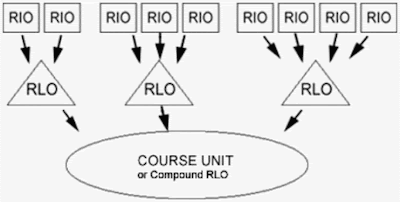
Cisco Systems used a schematic approach to describe the structure of the RLO, defining the reusable information object (RIO) as a component that has similar properties to the RLO[7]. The RIO consists of static, animated and interactive content including text, diagrams, pictures and videos as well as practice examples and assessment items. Each RIO is built so that it supports the objective of the RLO. Cisco's RLO has a structure that fits Longmire's summary.

RLO Content
Cisco also developed a strategy for building and implementing the RLO - the primary learning approach is identified to determine what the RLO should contain and this prescription then serves as a plan for its design and construction. Suggested optimum componentry includes an overview, summary and assessment - between five and nine RIOs, though this range may vary widely in practice. A series of RLOs can be constructed according to a pedagogical strategy to form part of a course, or to build a compound RLO.


Granularity

The smallness of each component part, and the number of these incorporated into the whole, relates to what is called the granularity. Though the term is widely used in the context of RLO design and development, there appears to be no clear-cut definition for it. Collis and Strijker describe granularity as “just one of many issues related to learning objects that have different meanings and implications in different organisational contexts”[8].

Granularity has administrative implications when considering matters related to the cost of production and also the data retrieval of each part. In relation to the size of the RLO, granularity has also pedagogical implications especially if it has insufficient componentry to be considered a suitable unit of learning. The RLO should be neither too large in comparison to the size of its components nor too small to perform the pedagogical function in meeting its learning objective.

Simplicity of design applies as much to the construction of a good learning object as it does to folding a well-made paper dart; size and functionality need to be optimally balanced for the learning object to be on target.


Metadata, storage and retrieval

For a learning object to be stored and later retrieved easily, it must be catalogued or labelled using metadata, essentially data about information. Criteria for defining metadata and the number of related attributes within it vary according to the specification used. The label or tag, known as the metadata tag, contains digital information that identifies all the important properties of the learning object.

When a learning object is selected from a repository its many parts are brought together according to the attributes chosen from its metadata tag. In this way the appearance of the object when displayed may be tailored within the limits of the metadata criteria and according to selected preferences on retrieval. Learning objects that form part of a programme of learning are stored in a repository or repositories accessible by a learning content management system (LCMS)[9] suitable for processing the learning object metadata (LOM)[10].


For LOM to be useful it must adhere to an unambiguous specification of which there are many, including those defined or used by Dublin Core[11], SCORM (Shareable Content Object Reference Model)[12], The Le@rning Federation[13], MERLOT[3], CLOE (Co-operative Learning Object Exchange)[14] and IEEE (Institute of Electrical and Electronic Engineers)[15]. The IEEE Learning Technology Standards Committee has established a set of internationally accepted open standards for learning object metadata adopted by other organisations.


Learning objects should be practical

The learning objective must be suitable for the application of a learning object, and for some purposes there are limitations no matter how well the learning objects are designed. The pursuit of such tools to meet associated learning objectives in these cases will very likely prove fruitless. For instance, it is clear that a learning object cannot be a substitute for a chat-room discussion. Nor would it be fitting to offer one as a replacement activity where the learner is required to collect data from a series of location cams, especially if the gathering process is important to the learning.

The learning object employs a wide range of audio, video, animation and interactive technologies and is perfectly suited to e-learning. It is especially useful for introducing the learner to concepts difficult to present in text, static diagrams or pictures, or where it is difficult or dangerous for the learner to view a particular event such as the separation of chromosomes in the dividing nucleus of a living cell[16] or the Strombolian eruption of a volcano[17].

When the learner is finished interacting with a learning object, what is important is not the impact of a clever animation or an impressively dynamic video, but the learning that's imparted, and the relevance of that to the circumstance of the learner. It must furnish the learning objective that was on its designer's notebook and it should be memorable for that alone.


Immediacy, interactivity, learning and engagement


Wiley recognised that interactivity is a vital attribute of an effective learning object as “engaging learners, making them active participants in the learning experience, is key to having them meet the learning objective”. Interactivity brings immediacy to the learning through instant feedback and lights the spark[18], but its importance is frequently overlooked during the design phase of a learning object.

Though it is rarely the province of a learning object to process learner activity or to perform summative assessment, the
information that may result from these is what most teachers look for to establish if learning has taken place. Yet in potential learning situations the learner is often out on a limb wondering what, if anything, has been learned.

Authors of early textbooks realised the worth of passive feedback in questions that had answers at the back of the book, alerting the learner to the need for further study when required. Recently, metacognition – thinking about thinking – in relation to the learner thinking about learning has become a fashionable teacher consideration[19].

With respect to these matters the importance of immediate feedback to the learner on what has been learned and what needs to be learned cannot be underrated. And while it is true that opportunities for learner feedback and formative assessment do not ensure that learning happens, their presence allows the learner to evaluate learning progress and they can also stimulate engagement[20]; herein must reside one of the requisites of a well-designed learning object.

Design, development and quality maintenance

Learning object development is no longer constrained by the dictates of those with expert technical knowledge and specialist ability. The steady arrival on the market of new authoring tools permits teachers with little technical know-how to design and create learning objects for themselves. But a most important role of the experienced teacher is in the selection and application of effective learning objects.

It appears that these tasks, as well as those to do with building the resources, have fewer problems if careful thought is given at the design stages well before construction begins. Margaret Haughey and Bill Muirhead[21] found that “incorporating all accessibility features into all learning objects made the learning objects more complex to develop, more costly to create and in limited cases adversely affected the overall design of the learning object. An alternative was to develop separate purpose-built learning objects for learners with specific special needs.”

They put forward a case for developers addressing additional accessibility criteria on an object-by-object basis. Haughey and Muirhead also contend that the trend towards learner-oriented inquiry puts less emphasis on teacher pedagogical orientation and that this shift may favour a more learner-centred approach in the future use of learning objects.


Leppisaari and Vainio[22] posited that “collegialism” among those engaged in learning object development is also valuable for maintaining the pedagogical quality of object content. This opinion is also held by MERLOT[3] where resources are peer-reviewed to ensure quality standards, and by CLOE where recognition is given to the special value of peer reviews in learning object development. CLOE suggests guidelines as well as a model for the peer review process[23].

Rachel Smith offers a cornucopia of invaluable ideas, tips and advice in her comprehensive paper, Guidelines for Authors of Learning Objects[24]. She upholds the principle of learner choice, maintaining that “an object that presents content in an appealing setting, inviting learners to explore at will, is more interesting than a single-path, linear, 'click here to proceed' format. If the only choice is when to click the 'next' arrow, it is difficult for learners to feel ownership of the learning process.”

She gives sound planning suggestions for building cohesive, well-integrated learning objects:

Offer multiple paths or branches for learners to explore. Allow learners to choose which path(s) to follow rather than forcing them down a particular path. Draw a conceptual map of the learning object showing relationships between ideas, content, or sections. As you create the object, make sure those connections are available as path choices.

Smith suggests various avenues for presenting learning objects including “a single learning object to reinforce or provide practice for a topic; sometimes several conceptually related learning objects are provided to explore a topic from different angles or in greater depth. A common way to 'combine' learning objects is to provide an assignment that includes a list of links to the different objects and guidance as to the order in which they should be accessed. Learning objects may also be integrated into a course using a learning management system (LMS) to create and manage the links between objects.”


Checking out the future

While the popularity of computer gaming continues to grow and interest deepens in the use of computer games as legitimate means for learning[25], new avenues open for the RLO to continue its development as an e-learning tool. There is no reason, for instance, why games can't be designed to meet all the desired attributes of RLOs.

There is also scope for e-books to provide platforms where RLOs can exist as aptly as coloured pictures do in printed books, perhaps fulfilling some of Pithamber Polsani's hope for the development of the e-book to move “beyond the text-centric approach and concentrate on designing participatory environments”[26].

Here the potential is rich for the RLO to establish its niche, illustrating pages of learning in interactive and engaging ways never to be found in traditional textbooks. Who knows? Games designed as learning objects may soon find their way onto portable play-stations, MP4 players and even mobile phones.


References

1. http://www.futurelab.org.uk/resources/publications-reports-articles/web-articles/Web-Article948
2. http://en.wikipedia.org/wiki/Computer-assisted_language_learning
3. http://taste.merlot.org/
4. http://itdl.org/Journal/Sep_04/article02.htm
5. http://opencontent.org/docs/dissertation.pdf
6. now not available - http://www.learningcircuits.org/2000/mar2000/Longmire.htm
7. http://www.e-novalia.com/materiales/RLOW__07_03.pdf
8. http://www-jime.open.ac.uk/2004/4/collis-2004-4.pdf
9. now not available - http://www.learningcircuits.org/2002/apr2002/mortimer.html
10. http://en.wikipedia.org/wiki/Learning_object_metadata
11. http://dcmi.kc.tsukuba.ac.jp/dcregistry/
12. now not available - http://www.adlnet.gov/scorm
13. http://www.thelearningfederation.edu.au/default.asp
14. http://sedoparking.com/search/registrar.php?domain=on.ca&registrar=sedopark
15. http://ieeeltsc.wordpress.com/
16. http://www.cellsalive.com/mitosis.htm
17. now not available -
http://volcano.und.edu/vwdocs/kids/fun/volcano/volcano.html
18. http://www.futurelab.org.uk/resources/publications-reports-articles/web-articles/Web-Article621
19. http://www.futurelab.org.uk/resources/publications-reports-articles/web-articles/Web-Article520
20. http://home.sprynet.com/~gkearsley/engage.htm
21. http://www.usq.edu.au/electpub/e-jist/docs/vol8_no1/fullpapers/eval_learnobjects_school.htm
22. http://www.caudit.edu.au/educauseaustralasia07/authors_papers/Leppisaari-Poster-405.pdf
23. now not available - http://cloe.on.ca/peerreview.html
24. http://www.nmc.org/publications/learning-object-guidelines
25. http://acrlog.org/2007/06/06/serious-games/
26. http://jodi.tamu.edu/Articles/v03/i04/Polsani/

Ka kite anō – Catch ya later

Friday, January 16, 2009

Refinding The Index

Tēnā koutou katoa – Greetings to you all
Refinding The Index
There has been doubt hung on the worth of past learning over the years. Recently, Bill Farren put into question the value to young students of what has been learnt by ‘old’ teachers. There has been much new debate about the efficacy of content, which presumably is a record of past learning. Out of a plethora of bellicose discussion came the notion that the use of textbooks, whether paper or digital, is now past its use-by-date.

A million hits:

How much of this has come about without real thought being given to the usefulness of past learning? Perhaps it is motivated by other factors not at all related to the worth of what has been learnt.

Could it be that the huge amount of content, the ease that this can be displayed through in-your-face millions of hits on Google, has driven our pedagogues to a state of desperation? Has the burgeoning quantity of data forced teachers, and teaching authorities, to swing the pendulum away from teaching content, in a bid that’s really centred on self-protection, albeit perhaps unintentional?

What’s on the cutting room floor?

It’s known that copious decision-making tires the mind, causing wrong decisions to be made, often at times when the correct choice is crucial. But when teachers have to select a useful curriculum from the great unwashed heap of knowledge, the decision-making that has to take place is profuse.

Perhaps the use of Occam’s Razor in education is becoming commonplace, so that all problematic issues, including content, finish on the cutting room floor. It certainly seems to be the growing practice when the challenging issue is student behaviour. Perhaps it’s not the content that’s the problem, but the way it’s being selected for learners.

Access to content:

Textbooks have been subject to makeovers for decades. Broad indicators of the changes can be examined without any real understanding of the knowledge the books contain. Indexing, as one specific indicator, has undergone dramatic change in the last 50 years, from the algebraic nightmare of numerically indexed paragraphs within chapters, to the complete absence of an index.

Mid-twentieth century textbooks had contents pages, traditionally near the beginning of the book, and often had an index at the rear. Latterly, the style and format used for the layout of content pages and index pages were at the whim of the publisher. Many formats were designed for looks rather than utility.

Whose responsibility?

It was not uncommon for a textbook to have an index that learners couldn’t or wouldn’t use. A textbook with such an index is as useful as one with no index at all. I recall having several textbooks like that in the 70s. They were good resources for what they contained. Their indexing was so bad, however, that I had to develop my own system for refinding the information. I’m still doing that with ebooks today.

Apparently, the onus to take charge of indexing, as well as the refind that Tony Karrer talks about, is being placed firmly on the learner. There’s no doubt that being responsible for refind is becoming a learning necessity - almost an indispensable learning skill for those who have accumulated the so-called 21st century skills.

Though I don’t doubt the usefulness of the skills, I wonder how much the need for some of them is being impelled by a move away from traditional indexing in learning resources, both digital and printed, that are being built for use in schools and tertiary institutions.

related posts - >> ( 1 )

Ka kite anō – Catch ya later

Thursday, January 15, 2009

This Is Not An Advert - It's A Rant

Tēnā koutou katoa – Greetings to you all
I’ve just read Dick Carlson's How to create amazing technical learning. It’s an ebook that contains a lot of down-to-earth common-sense advice. It’s a good read and hilariously funny, lightening what could otherwise be a rather boring topic.

Carlson gives some grunty tips on preparing and delivering training as well as pointers on how to handle a few aspects of a training company. It’s in a 72 page portable document format (pdf). Check out the link at the base of this post[1].

Techos hate them!

I like pdfs, and was surprised to learn that techos hate them. A couple of years ago, I had a really useful discussion with my son, Jack, who explained what it was about pdf files that irked the pants off techos.

I remonstrated at the time. On reflection, I now have to agree with Jack.


Some pdfs look good, smell good, feel good, but when you get down to using them as resources, they are inordinately difficult, if not near impossible to use. And there’s no excuse for this.

Hundreds of pages!

There are pdf resource ebooks that run to hundreds of pages but have no linked index or bookmarks to assist you to navigate the content.
I get lost and I’d give up on a lot of those if it weren’t for my dogged determination to learn the good stuff in them.


When I open an ebook, the first thing that hits me, even with some of the best, is the stunning quality of the huge images, the copious intros, and the trailing contents in the first, several pages. These are all very good for letting me know what’s in the book: I just get tired getting to the stuff.

As I scroll through the contents, I recollect the original intention of the pdf. It was to provide a way of sending a formatted electronic text that could be printed without problems to do with the exactness of how the printed end product looked.

Keeping up with the technology:

Since last century, Adobe has built some very useful and wonderful features into Acrobat. I won’t bore you with the details, but nearly all of those features come into their own when the pdf containing them is viewed from the screen.

These days, most pdfs are viewed from the screen, but they’re not made to be used that way. They’re designed as if they should be printed and read from the sheets. The problem is that the use of the technology has just not moved with the technology available.

Neither are resource ebooks meant to be read from start to finish. When I find a resource ebook that’s really useful, I have to open it in Acrobat and put in links, as well as bookmarks, to prevent me having cerebral blowout when I try to find things that are useful.

Content? Link it!

Even with a large ebook, it doesn’t take me longer than half an hour to put the links in. But it’s easier to do when the pdf is first made, and of course, I’ve no control over that decision. Content links, as well as bookmarks that can be opened from the left margin, can be planned when the text file is first created, and before the pdf is made.

Check out the links and bookmarks in this Content Developer’s Bulletin by Becta. It’s only an 8 page pdf. But it’s written for people who haven’t a lot of time to scroll through even 8 pages looking for the good stuff.

Wonderful resources:

There are links to these wonderfully information packed resources that are hard to navigate at the base of this post[1 - 3]. Check them out too. They all have great, useful information in them. It’s a pity it’s so difficult to find. There’s one that’s admittedly a report[2] and not really an ebook – but it has over 270 pages!

The writers of The eLearning Guild post some splendid ebooks on all aspects of elearning. They are truly wonderful and I recommend them to anyone interested in learning some good tips and skills. One of their books has 834 tips for successful online instruction[3]. It runs to 71 pages. I’ve used it a lot, and I kept going back to it, but only after I’d thrown it into Acrobat and bookmarked the sections.

I’m all for moving with the technology. Let’s use ebooks, yes, but let’s also have them made using the up-to-date features available with today’s technology, so that the functionality of the product is also up-to-date.

  1. Creating Amazing Technical Learning - Dick Carlson
  2. Enhancing Child Safety & Online Technologies - The Berkman Center For Internet & Society, Harvard University
  3. 834 Tips for Successful Online Instruction - The eLearning Guild

( 2 ) << - related posts

Ka kite anō – Catch ya later

Sunday, January 11, 2009

What Do You Do With A Fan Of Links?

Tēnā koutou katoa – Greetings to you all
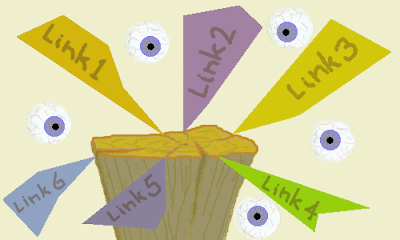
A fan of post links
Have you ever thought of how you go about reading links in a blog-post or a web-page? A recent posting on Sue Waters' enviably informative site impresses me by advising bloggers to cite relevant information using links (hyperlinks), as long as it doesn’t mean going hyper with a fan of links. I go along with her reasoning. I also find comfort that she (a scientist after all!) is as fond of a fan of links in a post as I am.

Links in a post can be extremely useful. They can put you in touch with people you didn't know existed. They can also keep you up to date with things perhaps you should know about.

Most recently, there seems to have been an increase in the attention given to the ‘cognitive overload’ that accompanies sifting through burgeoning masses of information online – the dizzy headaches the hazy eyes – the lack of concentration the spinning head.

These symptoms are exactly what I experience when I visit a fan of links, one after the other, while also trying to follow the highbrow train of thought of the blogger who posted them.
Following up a fan of links baffles me! Link becomes a four-letter word.

Decision making can be exhausting:

Making decisions can tire the brain, apparently. But making decisions is exactly what you have to do while sweeping through a bevy of links, skimming through the accompanying articles as you go. When I do this, my brain constantly
has to come up with yes/no answers to a fan of questions:
  • Is this information going to be any use to me?
  • Should I know this?
  • Is it going to be any use to someone else?
  • Could this be useful for my students, say?
  • Should they know this?
  • Is what I’m reading important enough to come back to?
  • What’s it got to do with what the writer’s saying anyway?
I get up to about link 5, and recognising that I’m on the verge of blowing a gasket, I break - for a coffee. It's probably the best thing I could do.

One method I’ve used is to ignore the links altogether, at least in the first read. I bash on with what’s in the post or article to try and make some sense of it. This sometimes works.

But if there’s essential information cited through links, especially early in the text, and I know nothing about that stuff, I’m sunk. My brain runs out of steam when following the rest of what's there to read. My understanding wobbles. I effectively go nowhere when I try to continue reading.

I’ve then got to stop, retrace, and do some homework on the content in the links. This procedure is irksome, frustrating in the extreme, probably because by that time, I’ve got the old cognitive overload syndrome. Again. My head starts spinning.

There have been several postings recently on writing for skimming, notably Tony Karrer's, and there is certainly room for improvement in the way material is presented to reader/learners. But the need for the reader/learner to improve skills and strategies for coping with floods of new information is also becoming a major priority in the workplace.

But what's the best way of tackling a fan of links? If you have any thoughts on this, strategies or practices that you could share, please let me know. My head hurts.

Ka kite anō – Catch ya later

Friday, December 19, 2008

Let Me Count The Ways

Kia ora tātou – Hello Everyone
A Bookcase on the Scrapheap
The book and the paper it’s made from have recently taken a rap. The suggestion is that the book is outmoded. It's well past its use-by date in education and it's not environmentally friendly.

I like the book. Having had a lifelong association with the invention,
I realise my opinion inclines in its favour.
To be fair to the book in the context of learning, however, the reasons gathered in support of its removal or replacement should be related to its merits and demerits as a learning resource.

When weighing the stresses, it is difficult to assess its effectiveness against digital counterparts unless a few ground rules are defined.


Judged by its cover

It is unfair to pitch the book against such things as an online chat or a wiki. Whatever the equivalents of these technologies will look like in future, their application and purpose cannot be compared, with any relevance, to those offered by a book. Try comparing the virtues of a submarine with those of a helicopter and you’ll see what I mean.

Neither is it fair to condemn the book just because its content may go out of date. Data in a web-page, a blog post or even a tweet are just as likely to go out of date, and for the same reasons, with no likelier promise of edits to correct these.

What are the benefits and drawbacks?

The rate of use of paper throughout the world is now higher than ever; it rages wildly and at a mounting pace. But it’s not the book, textbook, printed educational literature or school note-pad that is mainly to blame for the burgeoning rate of paper production. Advertising, and the wasteful packaging of goods, contribute to more than half the global consumption of paper.

More trees

This does not detract from the volume of paper consumed for educational purposes. It is huge. A recent article on campus sustainability and paper consumption by Clark University, reported that 720 trees are harvested each year to supply printer/copy paper for that establishment alone. It may be just a leaf in a tome, but I have an eye for conservation, and that fact leaves me pondering.

Burgeoning content

Sheryl Nussbaum-Beach states, in her September video, that by the year 2020, knowledge could be doubling every 72 hours.

She claims that by that time, there will be no place for the book in schools, as it would be impossible for it to keep pace with the rate of knowledge growth. Setting aside issues of relevance to the school curriculum, knowledge delivered at its predicted rate of creation by 2020 couldn’t possibly be accomplished in book form. I wonder if any data management system could ever deliver knowledge at such a rate - and for what purpose.

Pictures, images and diagrams

In the twentieth century, advances in the printing industry brought vibrant colour to illustrations in books. Only in the last 15 to 20 years has such quality of detail and colour been viewable on the computer screen.

The digital device has the edge on the book, with the use of diagrammatic sequence, melting images, moving images or other animated schema. Especially in student learning, there is a growing need for the use of visual images as learning tools to promote student understanding.

Videos in particular can provide amazingly detailed imagery. With the animation technology available today, it is possible to view a 3D virtual journey through the chambers of the human heart, or to observe the journey through the intake and exhaust valves of the internal combustion engine.

As David Whitehead said in his speech on strategies for improving literacy, simply asking students to imagine (as a thinking/learning tool) may not be as successful as it was in the past.

One might be forgiven for thinking that this may be as a result of the use of explicit animated imagery, rather than other teaching tools that are perhaps more likely to exercise the imagination of young minds. For as limited as a book may be in depicting complex concepts in pictures, its practiced use has the power to stimulate the imagination.

Visuals with text

When creating a learning resource, there is a tendency to overuse the features available to the digital resource designer. While acceptable and effective page design has become a well-established skill in textbook writing, the same cannot be said universally of digital learning resource design.

The misuse of PowerPoint as a learning tool highlights the vagaries of incorporating voice with text. Their joint use accompanying displayed images or diagrams in a learning resource causes cognitive overload in the learner. It is difficult to achieve this with a textbook. Verbal and written information simply cannot be presented simultaneously unless the teacher speaks while the learner is trying to read.

Copyright moves quick quick to music

One of the wonderful things about books is their ability to be shared.
A book, when first sold, can then be lent, gifted or sold again – the so-called first-sale doctrine.


But for the existence of that principle, libraries, second-hand book and CD stores, as well as video rental outlets would be illegal. Though there have been several attempts made over the decades to place restrictions on the resale of printed books, actions restricting the sharing of digital equivalents have moved more fiercely. It seems that even the publishers of printed resources may now wish to cash in on this idea.

It was suggested in The Future Of The Internet III that copyright protection technology may dominate content control in 2020. A little less than a third of expert opinion surveyed agreed that this was a likely scenario.

The tractable e-book

As I said at the start of this soliloquy, I like the book. But the thought of a digital replacement still excites me. I’ve yet to get my hands on an e-book, like the Amazon Kindle. As Jim Henderson says:

"For this to go, there has to be buy-in by the publishers."

Haere rā – Farewell